
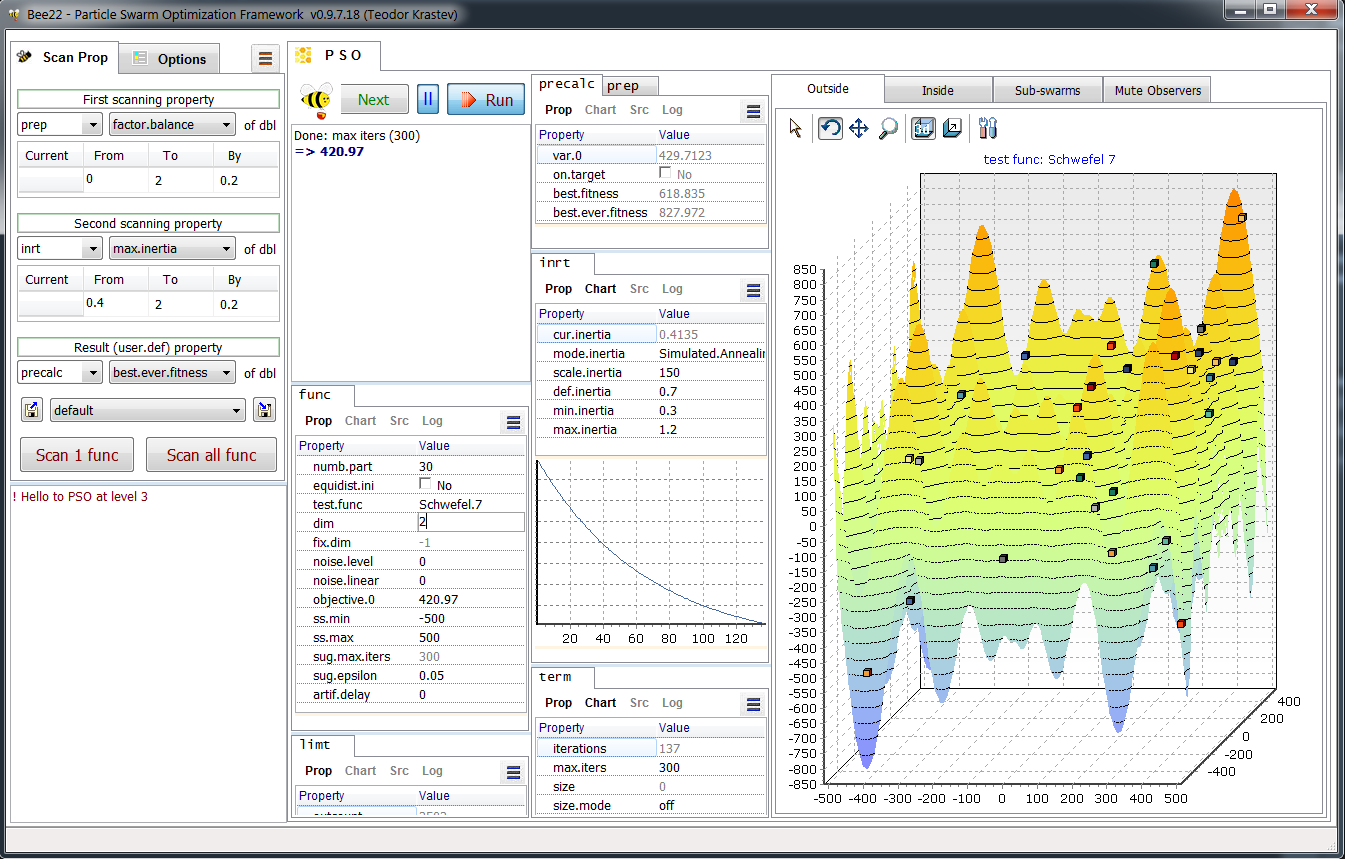
Main view of Bee22:
1.1 Scan properties
The user can choose one or two individual properties (as block name: property name) to be scanned. User can scan selection property, but for now in only one scanning parameter mode. The third property is a user-defined property which will be included in the results from each PSO run. After selecting the scanning properties user has to set the range and the step of scanning for each of them. For the selection type it will be check-list of possible selection to choose from. The whole scan setting can be save and reloaded from a file and will be saved automatically on close.
Options tab provides some useful features as stats, which means that each scanning parameters will be run Stats number of times and the average results will be recorded in the report. User can mute visual update of the blocks to speed up the execution (the effect is noticeable). User can define the float precision in the blocks and in the reports. At the bottom of the options tab user can open or save individually or in group the reports created as result of scan execution.
1.2 PSO Run / log and blocks of properties
PSO in basic configuration is classic PSO described in literature. The log will show the user the final values of the variables (solution) and the condition for stopping the iterations, or in case of error - some message. After you press Run, the optimization starts and on the left animated bee will indicate the running. Next to Run button we have Pause button and Preview/Next button. Pause button (switch type) will pause the iterations and wait to be disabled or to run next iteration by pressing Next button. Before the optimization user can press Preview button to chart the test function in Outside observer (first tab on the right).
The rest of PSO panel is filled with blocks. They are the essential part of Bee22. You can follow their functionality and user interface from the Blocks chapter. At some point in the future there will be flowchart type representation of the PSO algorithm and location of blocks in it for better illustration of the blocks functionalities.
1.3 Observers
Observers as their name suggest observe (DO NOT MODIFY) the PSO algorithm. They are called at each iteration and have read-only access to everything in PSO/particles. Observers are accessible at all user-access levels (1-3), and user can mute them (over speed concerns) by turning to the last tab (Mute Observers).
Currently there are three observers:
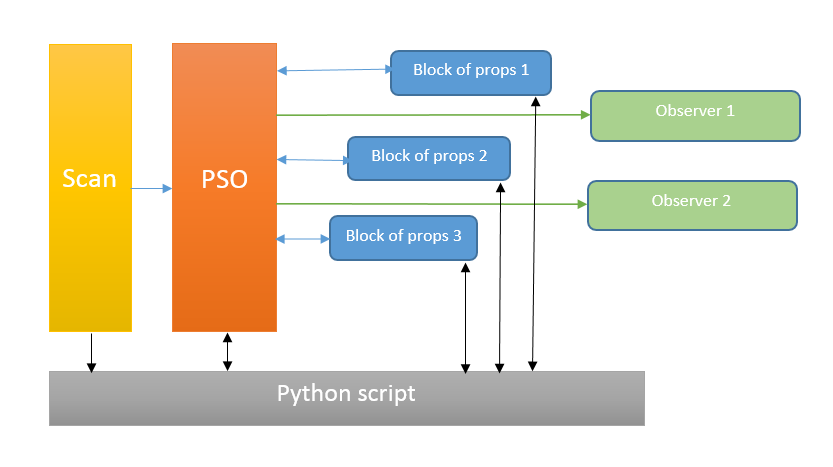
The underlying structure of Bee22 is simple: the core class is TPSO which
implements the classical PSO algorithm in its default state. Some of its
functionality is distributed in TParticle (by TList<TParticle>) and TAdjust.
TParticle encapsulate that part of the PSO algorithm which belongs to individual
particles. TAdjust encapsulate part of particle behaviour like inertia, social
and cognitive factors, which could be common (default), swarm specific or
individual for a particle. In the first case one TAdjust object will do the job,
in the second case - the TAdjust object will match the number of sub-swarms and
in the third one - the number of TAdjust objects will be equal to the number of
particles. All these classes are mutable by the blocks of
properties and/or Python script. The usual way to change a property from a
script is to change it the block and synchronize it with PSO.
The algorithm of PSO has been explained in details at so many places (see Resources) so I'll assume you have some idea. The particular construction here is to divide the algorithm into logical pieces, so each piece is encapsulated in a block as well as inside the main PSO class. When the program flow reaches a point where particular piece should be run the flow will continue either with default code (inside) or if the object of the block has been created it will go to that block. That block is optional as alternative to default (internal PSO class) code.
The block are described better in the Blocks chapter. Let me just mention that they follow Model-View-Controller (MVC) design pattern and are visible at user lever 3 only, at user level 1 and 2 the view won't show, but the properties can be read/write from PSO or a script.
The controller from MVC provides registration/unregistration of the models and script access. One controller is responsible for all models. Two noticeable issues here: first - fork is a mechanism to provide alternative blocks (functionalities) for the same location in PSO algorithm. When a block is registered in controller with its name and with its fork (location in PSO), two blocks cannot be registered at the same fork and a call to a block can be made by its fork name. Second issue is that in order to encapsulate more convenient (and simplify) the the use of the controller, a special class TctrlPort according Composite Reuse Principle is implemented.
TctrlPort = class
protected
ctrl: TController;
public
constructor Create(aCtrl: TController); overload;
procedure IniLoad(fn: string); // after reg all the models
procedure IniSave(fn: string);
function SetRslt(vr: variant): boolean;
function modelCount: integer;
function modelNameByIdx(idx: integer): string; // from 0 till gets back
empty
function propCount(mdlNm: string): integer;
function GetPropName(mdlNm: string; idx: integer): string; // from 0 till
gets back empty
function GetPropByIdx(mdlIdx, propIdx: integer): TPropVal;
function GetProp(mdlNm, propNm: string): TPropVal;
function SetProp(mdlNm, propNm: string; pv: TPropVal): boolean;
procedure Notify(mdlNm, propNm: string);
end;
Another way to oversee the PSO behaviour is thru Observers. They inherit common interface IObserver and the developer can register as many as necessary. Once an observer is register it will be called at each iteration so the use can follow the optimization process. Visually they are on the right and the user can mute them (turning the last tab) which will improve on the speed of calculations.
The general purpose of the block is to monitor and control PSO algorithm thru the blocks' properties. The manual control probably seems to be self-evident and easy, but scan offers you more systematic approach. That is study the behaviour of the PSO algorithm by changing (scan) one or two properties and record number of result parameters. The results are recorded in reports and can be studied later (saved and reloaded, individually or as a group). For each particular scanned value (or pair) optional number of optimizations are executed and the average results are presented. The user can also mute the block while the scanning is in process and define the float precision of the reported values. The scanning sets can be saved and loaded as *.scan files.
A scan can be performed on individual test function or on all (except for those with different dimension requirements) test functions in sequence, the respective number of reports is created. More details about scans and reports in the Scan chapter.
For deeper understanding of the program you can follow the code and the comments inside or contact me (within a reason).